
Every D2C founder knows the feeling: traffic is climbing, add-to-carts look healthy, and then you check the checkout report.
Dozens of carts are sitting at $52, $61, $68…
And there’s one thing they have in common: shoppers abandoned them the moment the shipping fee appeared.
Not because people didn’t want the product, but because the math stopped making sense the second a $7 shipping charge showed up uninvited.
You didn’t lose those customers to a competitor. You lost them to a number they didn’t see coming.
Here’s the thought that usually follows: “If I’d told them upfront how close they were, would they have added one more thing instead of leaving?”
That question is basically how the free shipping progress bar was born, not a growth hack, but a direct answer to watching carts die $8 short of a sale you already had.
This guide breaks down why a free shipping progress bar increases cart value, what’s happening in a shopper’s head when they see one, and how to build it into your Shopify store, app install, or custom build.
What is a Free Shipping Progress Bar?
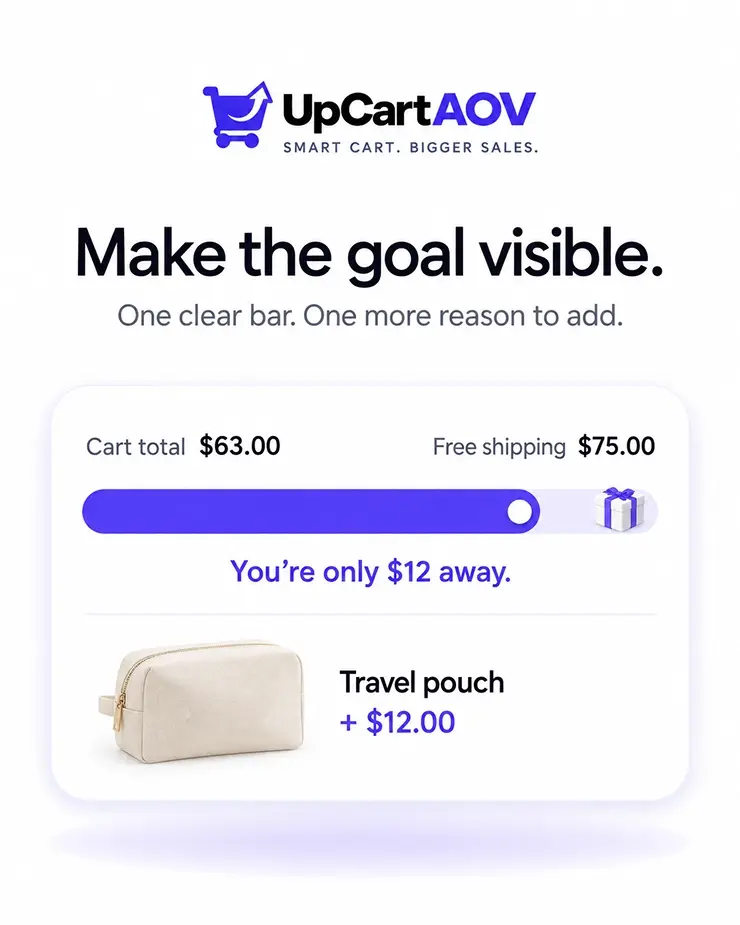
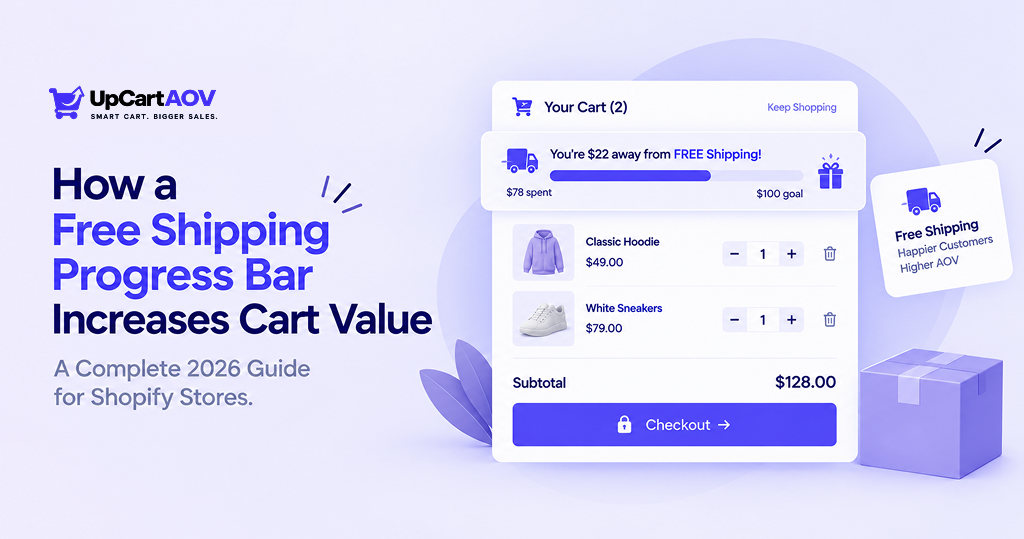
A free shipping progress bar is a visual bar in your cart drawer or cart page that shows shoppers how close they are to unlocking free shipping.
As they add products, the bar fills. Once they cross the threshold, it changes color or shows a checkmark with a message like “You’ve unlocked free shipping!”
Here’s the basic anatomy of a Shopify free shipping progress bar:
| Element | What It Does |
|---|---|
| Threshold amount | Cart value needed to unlock free shipping (e.g., $75) |
| Progress fill | Bar that fills as cart value increases |
| Dynamic message | Text updating in real time (“You’re $12 away!”) |
| Success state | Confirmation once the threshold is hit |
It commonly shows up in the cart drawer (slide-out mini cart), the cart page, or a sticky header bar. Most brands start with the drawer, since that’s where customers decide whether to add more or check out.
Here’s an expanded version with more depth added to each section while keeping the same conversational tone:
The Psychology That Makes It Work
You don’t need a psychology degree to get this. You’ve felt all three yourself.
We hate stopping when we’re almost done.
Think of a coffee loyalty card: you want to finish it more than you want the free coffee. A bar at 80% full pulls the same lever. This is the goal-gradient effect: the closer we get to a finish line, the harder we push.
Researchers first spotted this with actual loyalty cards; people sped up their visits as they got closer to a free reward, even though the reward never changed. Your cart bar does the same thing without you having to hand out punch cards.
Paying for shipping feels like losing money we already “had.”
Once a shopper is $9 away from free shipping, that fee stops feeling normal and starts feeling like a loss, so most would rather spend that $9 on a product. This is loss aversion, and it’s a stronger force than the promise of a reward. We feel the sting of losing $9 more sharply than we feel the pleasure of saving it, which is exactly why shoppers will add a second item to “beat” the fee rather than just pay it.
An unfinished bar sticks in your head.
Ever left a video paused at 90%? Same itch here: our brains remember unfinished things more than finished ones. This is the Zeigarnik effect: open loops occupy mental real estate that closed ones don’t. A half-filled progress bar isn’t just a UI element; it’s a small unresolved task your brain quietly nags you to close out, even after you’ve clicked away from the tab.
Stack all three together, and you get a checkout that’s arguing with the shopper on your behalf. This is why a free shipping bar turns a boring cart goal into a small game shoppers want to win, and why a free shipping progress bar increases cart value far more than a static “Free shipping over $75” line in your footer; the footer states a fact; the bar creates a feeling.
Want me to keep going and add a section on where this tends to fall flat (e.g., bars that are set too high, or shown too late in checkout)? Could be a useful counterpoint before you wrap the piece.
The Data: How Much Can It Actually Increase AOV?
This isn’t just theory; it’s one of the most documented levers in ecommerce.
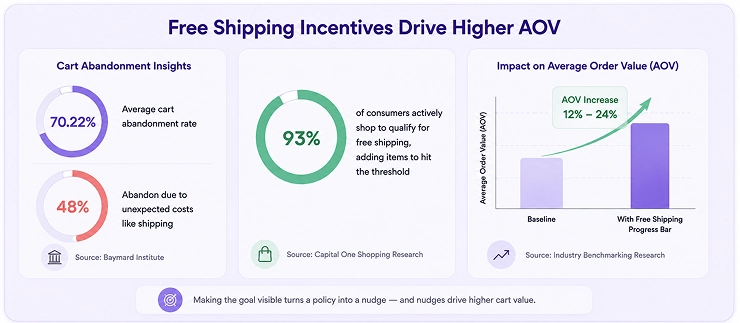
The Baymard Institute, aggregating 50 studies, puts average cart abandonment at 70.22% — roughly 7 out of 10 shoppers never complete a purchase.
48% abandon specifically because of unexpected extra costs, shipping being the top culprit, the exact gap a shipping bar closes.
| Data Point | Source |
|---|---|
| 70.22% average cart abandonment rate; 48% abandon due to unexpected costs like shipping | Baymard Institute |
| 93% of consumers actively shop to qualify for free shipping, adding items to hit the threshold | Capital One Shopping Research |
The pattern is consistent: a Shopify free shipping progress bar that visibly shows the gap outperforms a static “free shipping over $X” message.
Making the goal visible is what turns a policy into a nudge, exactly why a cart value increase with free shipping bar implementation is one of the highest-ROI changes a Shopify store can make relative to the effort involved.
Where and How to Place It for Maximum Impact
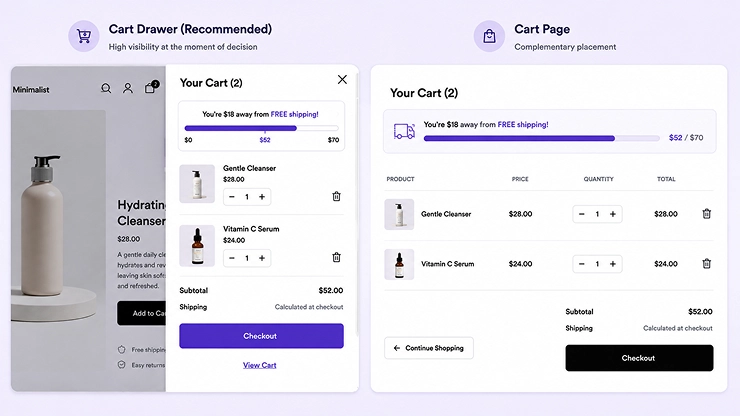
Placement matters almost as much as the bar itself. Of the three placements covered earlier, the cart drawer consistently wins; it appears at the exact moment a shopper decides whether to check out or add more. The cart page and sticky header work well as support, but the drawer should be primary.
A few free shipping progress bar best practices:
- Use a color that contrasts with your cart background
- Keep copy short and specific: “You’re $12 away!” beats a paragraph
- Animate the fill slightly when it updates
- Keep it visible above the fold on mobile
- Show a clear success state once the threshold is hit
Pair Free Shipping With Relevant Product Recommendations
A progress bar tells shoppers how much more they need to spend. Product recommendations can help answer the next question: what should I add?
That’s where recommendation strategies such as Frequently Bought Together and You May Also Like can complement a free shipping goal. The right approach depends on whether you want to encourage complementary purchases or help shoppers discover additional products.
See our comparison of Frequently Bought Together vs. You May Also Like to understand which recommendation approach fits different Shopify shopping journeys.
Setting the Right Free Shipping Threshold
Set the threshold too low, and you give away shipping on orders that would’ve converted anyway. Set it too high, and shoppers give up instead of adding more.
A simple starting formula for a customer-facing target:
Threshold = Current AOV × 1.1 to 1.3.
If your AOV is $60, a threshold between $66 and $78 is close enough to reach, far enough to still nudge spend upward.
That formula is a good customer-facing starting point, but it doesn’t check whether you can actually afford to give shipping away at that number.
For a margin-safe threshold, use:
Threshold = AOV + (Average Shipping Cost / Gross Margin %)
This backs into a number that guarantees the extra spend covers what you’re giving up.
For example, if your AOV is $60, average shipping cost is $8, and gross margin is 40%, the threshold works out to $60 + ($8 / 0.40) = $80.
At that point, the extra $20 a customer spends to unlock free shipping generates enough margin to fully absorb the $8 shipping cost, so the offer pays for itself instead of eating into profit.
If the margin-safe number comes out noticeably higher than the AOV-based one, that’s a signal your shipping costs or margins need a closer look.
| Mistake | What Happens |
|---|---|
| Threshold too low | You absorb shipping costs on orders that didn’t need the nudge |
| Threshold too high | Shoppers get discouraged and abandon instead of adding more |
| Threshold never tested | You’re guessing instead of optimizing |
Test different thresholds with an A/B tool, running each version for at least two weeks to account for weekday/weekend shifts.
Adding a Free Shipping Bar to Your Shopify Store
There are two ways to add a free shipping progress bar: using a Shopify app, or coding it manually into your theme.
Option A: Using a Shopify App (Fastest, No Coding)
Search the Shopify App Store for a free shipping bar app, install it, and connect it to your theme. Most apps auto-detect your setup and inject the bar into your cart drawer.
Set your threshold, customize the copy and colors, preview on mobile and desktop, then publish and test.
Pros: No developer needed, quick setup, some apps include A/B testing.
Cons: Adds another app (can affect speed), ongoing subscription, less design flexibility.
A progress bar is one piece of a larger Shopify storefront. Its effectiveness also depends on your theme structure, cart experience, mobile UX, navigation, and conversion flow.
Option B: Manual Coding (Custom, Full Control)
For brands who want full design control and no extra app overhead, the bar can be coded directly into the theme:
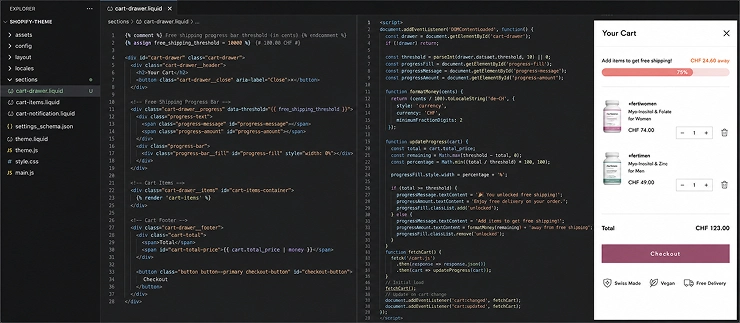
Set the threshold as a variable in the theme’s Liquid file (e.g., cart-drawer.liquid), stored in cents to avoid rounding issues.
Pull the live cart total using Shopify’s cart.total_price, comparing it to the threshold to get the fill percentage.
Build the bar markup, an outer container at 100%, with an inner <div> whose width is set dynamically via CSS. Update it live with JavaScript, using Shopify’s Ajax Cart API (/cart.js, /cart/add.js), so it refreshes instantly without a page reload.
Handle the unlocked state by swapping the messaging once crossed. Test on mobile, where most Shopify traffic lives.
A well-built version also accounts for a few edge cases most stores overlook: what happens if a shopper removes an item and drops below the threshold (messaging should revert smoothly, not just vanish), and whether the threshold is calculated pre- or post-discount, which affects margins on promo-heavy days.
Storing the threshold as a theme setting rather than hardcoding it in Liquid also lets store owners adjust it seasonally without a developer.
Pros: No added app weight or subscription, fully matches brand design, faster load times, and full control over edge-case behavior.
Cons: Needs developer time to build, test, and maintain through theme updates, and every future theme change carries a small risk of breaking the custom logic if it isn’t documented well.
A free shipping threshold is only one way to increase what customers spend per order. Other tactics, from strategic upsells to product bundling and cart optimization, can work alongside it. For a broader strategy, see our guide to ways to increase average order value on Shopify.
Common Mistakes That Kill Conversion Instead of Boosting It
- Threshold set too aggressively: $40 away on a $50 cart drives abandonment, not add-ons. If the gap feels like “a whole new order” instead of “one more item,” shoppers close the tab.
- Poor mobile visibility: a bar that looks fine on desktop can get squeezed out of view entirely inside a real mobile cart drawer, especially on smaller screens.
- No fallback messaging after unlock: confirm it clearly (“You’ve got free shipping! 🎉”) instead of leaving stale copy. A bar that just disappears wastes a genuine moment of delight.
- Feeling like a gimmick: a free shipping bar boosts average order value claim only holds when the offer feels genuinely achievable. Set the threshold unrealistically high, and shoppers see it as manipulative rather than helpful.
- Ignoring seasonal shifts: a threshold that works in a normal month might feel out of reach in a slow season, or too easy during a high-intent sale period. Revisiting it quarterly keeps it aligned with how customers are actually shopping.
How to Measure Success (KPIs to Track)
Track these metrics before and after launch:
| Metric | What to Watch For |
|---|---|
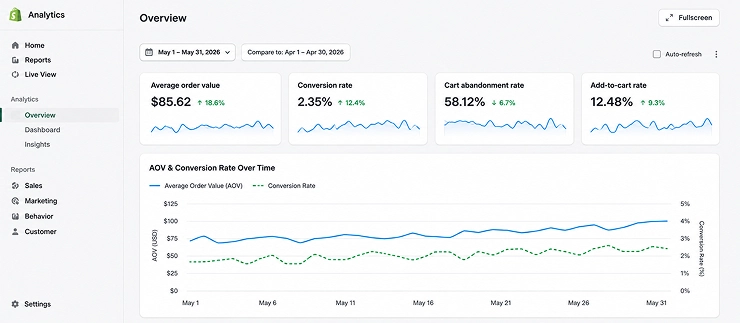
| Average Order Value (AOV) | Should trend upward within 2–4 weeks |
| Cart abandonment rate | Should decrease as shoppers complete the threshold |
| Conversion rate | Should hold steady or improve |
| Add-to-cart rate | May increase as shoppers add “just one more” item |
Use Shopify’s built-in analytics with GA4 and a heatmap tool to see if shoppers notice the bar.
What Founders Are Saying
Real feedback from founders who’ve worked through Shopify store optimization projects:
“I cannot express enough appreciation to the experts who helped solve the problems on my website. Their expertise and dedication had a significant impact on the performance and functionality of my site.” — Blend Ease
“As guaranteed, the team did an amazing job. Once again, it has been a very clean and satisfying experience with your service.” — Naor
“I highly recommend them for all your design requirements. Extremely high quality of design, responsiveness, and communication.” — Manoj Mohan
While these speak broadly to store optimization rather than the shipping bar specifically, they reflect the detail-focused work behind implementing conversion levers like this one correctly.
Conclusion
A free shipping progress bar increases cart value by turning a simple UI element into a psychological nudge shoppers respond to almost automatically. It’s low-cost, quick to implement, and one of the most reliable ways to lift AOV without spending more on ads.
The real unlock isn’t just installing a bar; it’s the right threshold, the right placement, and pairing it with a genuinely optimized cart experience. Get any one wrong, and the bar becomes background noise.
Get all three right, and it quietly compounds with everything else in your funnel, from page speed to product recommendations to checkout design.
FAQs
Question: Is it worth it to offer free shipping?
Answer: Yes, in most cases. 93% of consumers shop to qualify for free shipping, and 75% prioritize it over fast shipping. With the right threshold, the extra items shoppers add typically cover the shipping cost, making it a self-funding growth lever rather than a straight discount.
What is the threshold for free shipping?
Answer: There’s no universal number; it depends on your AOV and margins. Use: Threshold = Current AOV × 1.1 to 1.3, then adjust based on real customer response. Stores with tighter margins should lean toward the lower end.
How to add free shipping on orders over a certain amount on Shopify?
Answer: Via Shopify’s native shipping settings (Settings → Shipping and Delivery), a free shipping bar app, or a custom-coded version in your theme. Native settings handle the rule itself, but won’t show a visual bar; for that, you need an app or custom code.
How can you offer your clients free shipping?
Answer: Build the cost into your pricing upfront, either by adjusting product prices slightly or calculating your average shipping cost per order and factoring it into your threshold. Negotiating better carrier rates as order volume grows also helps lower the break-even point.