
Should you show shoppers what’s frequently bought together, or what they might also like?
Does it actually matter which one goes on the product page versus the homepage?
Is your average order value stuck because you picked the wrong widget, or because you never picked a strategy at all?
And if both are already installed on your store, why isn’t either one pulling its weight?
These are the exact questions running through a Shopify founder’s head somewhere between “we just launched” and “why isn’t AOV moving.” Not as a shopper clicking “add to cart,” but as the person staring at a dashboard, wondering which recommendation widget is actually worth the app subscription, and which one is just sitting there, quietly doing nothing.
As we’ve built and optimized 50+ Shopify and Shopify Plus stores, supplements, subscription boxes, fashion, jewelry, pet care, and almost every founder has asked a version of this same question: Frequently Bought Together, You May Also Like, or both?
Instead of guessing, we started tracking it. That’s what this guide is built on.
Frequently Bought Together vs. You May Also Like
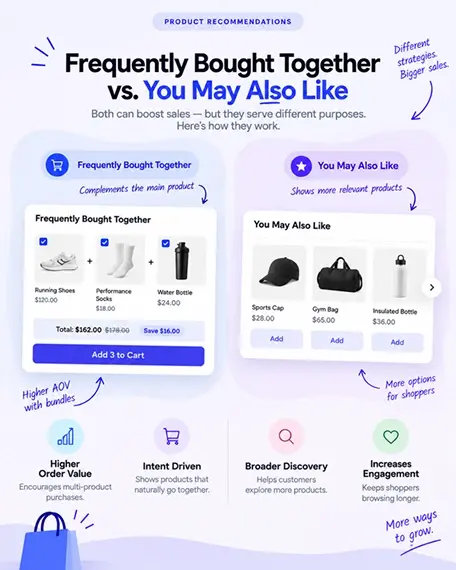
What “Frequently Bought Together” Actually Does on a Shopify Store
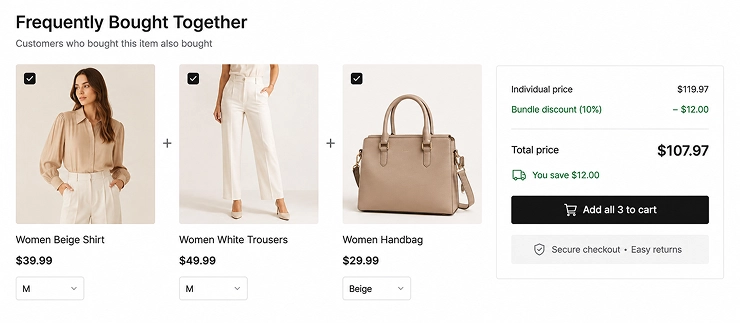
Frequently bought together Shopify widgets work because they remove a decision instead of adding one. When a shopper is already holding their wallet out, showing them “people who bought this also bought X and Y” doesn’t feel like a sales pitch; it feels like helpful packing advice. This is the Amazon-style “Frequently Bought Together” Shopify merchants have chased for years, because Amazon trained a whole generation of shoppers to expect it.
You’ll usually see it in two spots: right below “Add to Cart,” or inside the cart drawer.
Both work because the shopper has already committed to buying something; you’re just nudging them to buy a little more.
And unlike a random suggestion, this widget isn’t guessing. It’s built on real transaction history — what actually got bought together, order after order — which is what makes it feel natural and convert so well.
What “You May Also Like” Actually Does on a Shopify Store
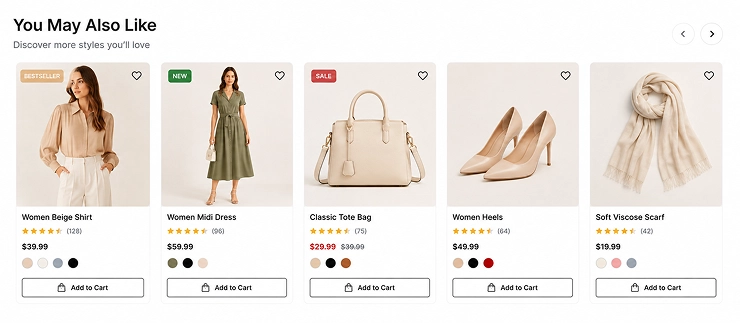
Now flip the scenario. A shopper lands on your homepage with zero intent yet, they’re browsing, not buying. This is where the Shopify “You May Also Like” section earns its keep: it’s not trying to close a sale; it’s trying to keep the shopper exploring until they find something they didn’t know they wanted.
You’ll typically find you may also like Shopify sections on collection pages, the homepage, or even an empty cart page, a smart way to rescue a shopper who almost left with nothing.
It can run on browsing behavior, an AI recommendation engine, or plain manual merchandising. That flexibility is a strength, but it also means the quality is only as good as the data (or curation effort) behind it.
Side-by-Side Breakdown
Here’s where the debate gets a lot easier once you see it laid out plainly.
| Factor | Frequently Bought Together | You May Also Like |
|---|---|---|
| Shopper intent | High, they’re already buying | Low to medium, still exploring |
| Best placement | Product page, cart drawer | Homepage, collections, empty cart |
| Data source | Real order history | Browsing behavior, AI, or manual picks |
| Main goal | Increase order value (AOV) | Increase discovery and session time |
| Feels like | A helpful packing list | A window-shopping suggestion |
| Best for | Consumables, kits, accessories | Fashion, home decor, broad catalogs |
This table alone answers a big chunk of the Shopify-related products vs bundles question: one widget bundles what people already buy together, the other simply surfaces what people might like to see.
Real Shopify Store Data: What Actually Moves the Needle
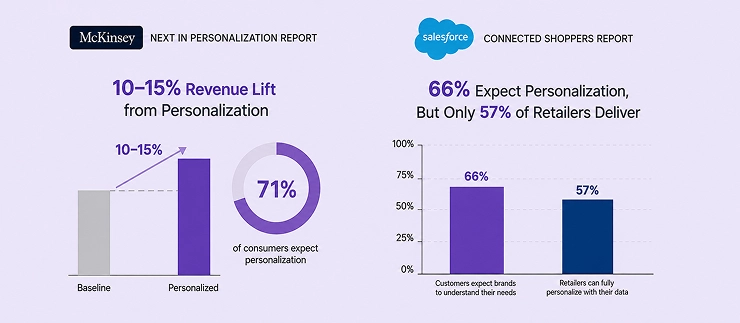
You don’t have to take our word for it. Two of the most cited industry research reports back this up:
| Source | Key Finding | What It Means for Your Store |
|---|---|---|
| McKinsey, Next in Personalization Report | Personalization typically drives a 10–15% revenue lift, and 71% of consumers expect it | Well-placed FBT and YMAL widgets are personalization in miniature; shoppers notice when it’s missing |
| Salesforce, Connected Shoppers Report | 66% of customers expect brands to understand their needs, but only 57% of retailers say they can fully personalize with their data | Most Shopify stores are still behind shopper expectations; that gap is your opportunity |
The takeaway is simple: recommendation widgets aren’t a “nice to have”; they’re one of the highest-leverage, lowest-effort ways to boost aov with frequently bought together and similar tools, but only when placed with intent, not installed and forgotten.
What Real Shopify Merchants Say About Using Both vs. One
Shopify merchants tend to have different experiences with these two recommendation options, depending on what they sell and how customers shop.
Here’s what two Shopify store owners have found after testing them.
“Using both gave us more flexibility without overwhelming the customer.”
— Sophie Martin, Founder, Maison Lune
“We use Frequently Bought Together for products that naturally work as a set, while You May Also Like helps customers discover alternatives and related products. The two sections serve different purposes, so having both has worked well for our Shopify store.”
“We found that one recommendation section was enough for our store.”
— Daniel Weber, Co-founder, Nord & Oak
“Our customers usually purchase individual products, so we chose You May Also Like instead of adding multiple recommendation sections. It keeps our product pages clean while still giving shoppers relevant products to consider.”
How to Choose the Right One for Your Shopify Store
Think of it less like picking a winner and more like reading your own catalog. Every Shopify store already has a natural lean toward one widget; you just have to know what to look for.
| If your store is… | Customer behavior | Best recommendation | Why it works |
|---|---|---|---|
| Consumable or complementary: coffee, supplements, skincare, pet food | Customers often buy products that work together | Frequently Bought Together | Natural pairing → Higher add-on potential |
| Discovery-led: fashion, jewelry, home decor | Customers browse, compare, and look for inspiration | You May Also Like | More variety → More product discovery |
| Large & diverse catalog | Customers shop differently across product, collection, and cart pages | Both | Right product + Right moment → More relevant recommendations |
Simple rule:
Complementary products → Frequently Bought Together
Discovery-focused products → You May Also Like
Large catalog + multiple shopping journeys → Use both strategically
How to Add Both Frequently Bought Together and You May Also Like to Your Shopify Store
This is where strategy turns into setup. The exact menu names can vary by app, but the process is the same everywhere:
Choose the placement → install the app → configure each recommendation → add it to your theme → test → track.
Here’s what that actually looks like, screenshot by screenshot, using UpCartAOV as the working example.
Step 1 — Map where each widget will appear
Before installing anything, decide where each recommendation belongs so the two widgets don’t compete with each other.
A simple setup is: Frequently Bought Together on the product page, close to Add to Cart; You May Also Like further down the page, on collections, or in the cart drawer. One widget helps shoppers add complementary products; the other helps them discover something different.
Step 2 — Install a recommendation app
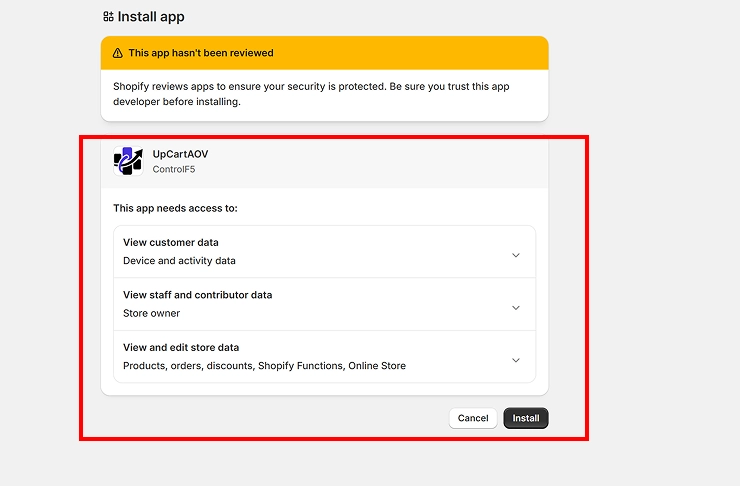
Search the Shopify App Store for a recommendation app; here, that’s UpCartAOV. On the install screen, review what access it’s requesting (products, orders, discounts, theme access), then click Install.
Step 3 — Choose which upsell blocks to enable
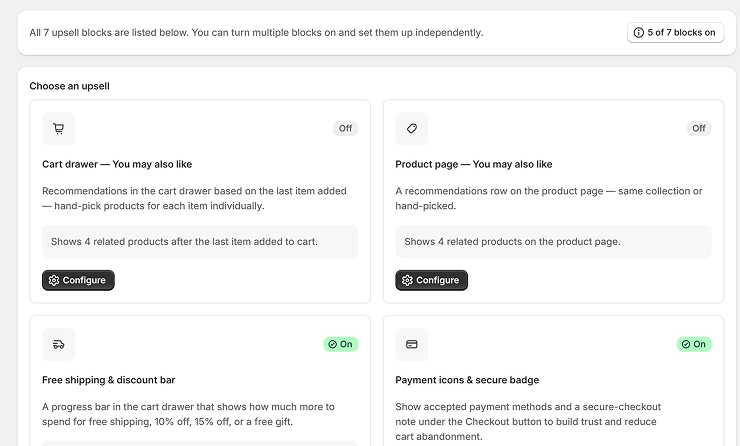
Once installed, you’ll land on the app dashboard listing every available block, Cart drawer You May Also Like, Product page You May Also Like, free shipping bar, payment badges, and more.
Find the block you want (for example, “Cart drawer — You may also like”), and click Configure to open its settings.
Step 4 — Configure the block
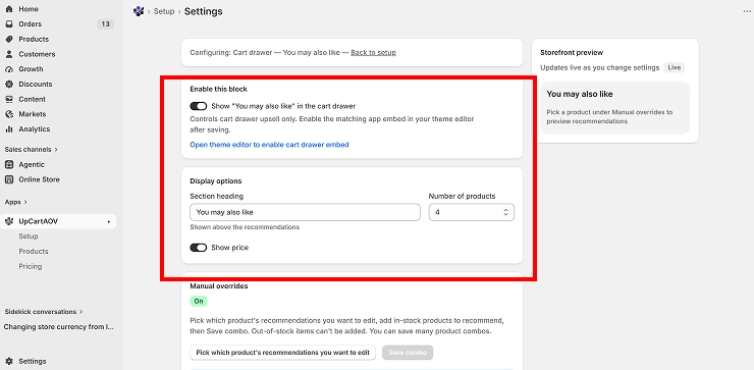
Inside the settings screen, switch on “Show ‘You may also like’ in the cart drawer,” type your section heading into the Section heading box, set Number of products using the up/down selector, and toggle Show price on or off.
Watch the Storefront preview panel on the right, it updates live as you change each setting.
Step 5 — Set manual overrides where needed
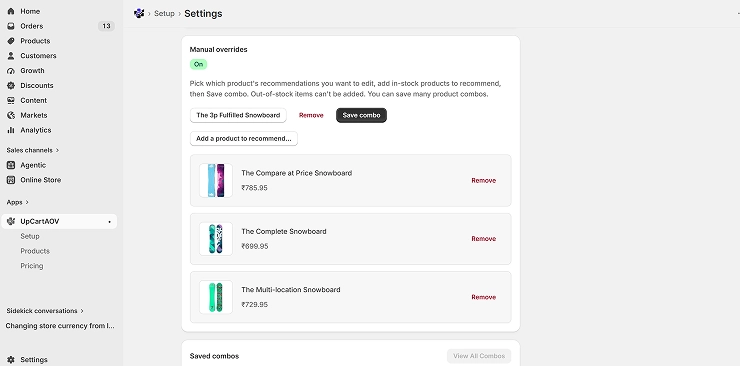
Scroll down to Manual overrides and switch it on. Click “Pick which product’s recommendations you want to edit,” choose a product, then click “Add a product to recommend…” to hand-pick the exact items that should appear alongside it.
Once you’ve added them, click Save combo.
Step 6 — Enable the app embed in your theme editor
Turning the block on inside the app isn’t enough on its own.
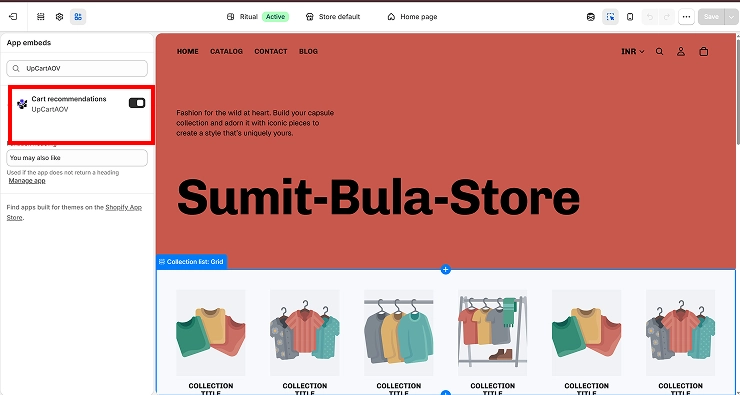
From the app settings, click “Open theme editor to enable cart drawer embed” (or go to Online Store → Themes → Customize manually).
In the theme editor, click the App embeds icon on the left sidebar, find UpCartAOV — Cart recommendations, switch its toggle on, then click Save in the top right.
Step 7 — See it live
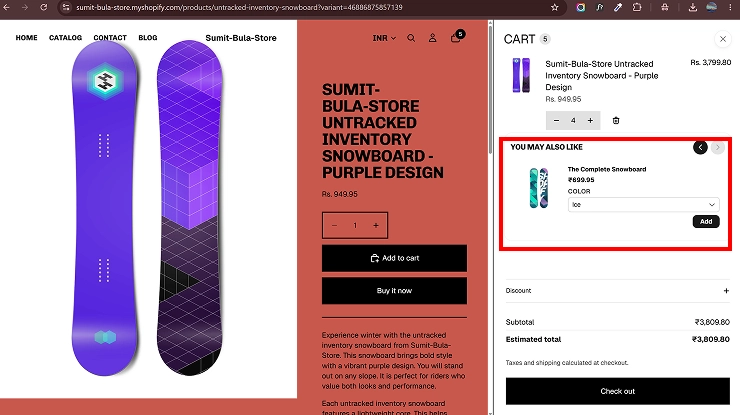
Open your storefront, add a product to your cart, and click the cart icon to open the cart drawer.
With both the block and the app embed switched on, “You may also like” now shows up right where you configured it, with real products, prices, and an Add button.
Step 8 — Test before you publish
Open your storefront and check both desktop and mobile:
- Are both widgets appearing in the right places?
- Are the same products showing up twice?
- Does Frequently Bought Together suggest genuinely complementary items?
- Does You May Also Like offer enough variety without feeling repetitive?
- Can shoppers still see and use Add to Cart easily on a phone?
If anything feels cluttered or repetitive, adjust placement or rules before leaving it live.
Step 9 — Track each widget separately
Don’t lump the results into one generic “recommendation revenue” number. Track Frequently Bought Together’s clicks, add-to-cart rate, attach rate, and revenue on its own, and do the same for You May Also Like, through the app’s built-in analytics or GA4 events where supported.
That’s what actually answers the question that matters: is your store better off running both, or is one doing most of the work?
That gives you a much clearer answer to the question that matters: Is your store better off using both recommendation types, or is one doing most of the work?
Conclusion
Frequently Bought Together and You May Also Like aren’t competing widgets; they’re two different tools built for two different moments in the shopper’s journey. FBT works best when intent is already high, turning a single purchase into a slightly bigger one. YMAL works best when intent is still forming, keeping browsers engaged long enough to find something worth buying.
The right choice isn’t about picking a winner; it’s about matching the widget to your catalog and your customer’s buying behavior.
Consumable or complementary products tend to do well with Frequently Bought Together, discovery-led catalogs tend to do well with You May Also Like, and larger, more diverse stores often benefit from running both, as long as each one has a clearly defined placement and purpose.
Whichever path you choose, the real driver of results isn’t the app you install, it’s whether you place it with intent, test it against your own store’s data, and keep tracking it after launch.
That’s what turns a recommendation widget from a passive feature into a measurable AOV lever.
FAQs: Frequently Bought Together vs. You May Also Like
Question: Can I use both on the same Shopify store?
Answer: Yes. Using both can work well when each widget has a different purpose. Place Frequently Bought Together near the buy button to encourage add-on purchases, while You May Also Like can appear earlier or lower on the page to support product discovery.
Question: Which one increases AOV faster?
Answer: Frequently Bought Together usually has a faster impact on AOV because it targets customers who are already ready to purchase. By suggesting products that naturally go with their selected item, it makes adding more to the cart easier.
Question: Do these widgets affect page speed or Core Web Vitals?
Answer: They can, depending on the Shopify app. Some recommendation tools add extra scripts, images, or tracking code that can slow down your Shopify store. Choose a lightweight Shopify app and check your page speed and Core Web Vitals score after installation.
Question: Is this different for Shopify Plus vs. regular Shopify stores?
Answer: The basic strategy is the same, but Shopify Plus stores may benefit more from advanced or custom recommendation logic. For most regular Shopify stores, a well-configured recommendation Shopify app is usually enough without the cost of custom development.
Question: Will running both widgets confuse or overwhelm customers?
Answer: Not when they’re used strategically. Keep the widgets in different sections, avoid showing the same products repeatedly, and give each one a clear role. This lets Frequently Bought Together drive add-on sales while You May Also Like supports product discovery.

