
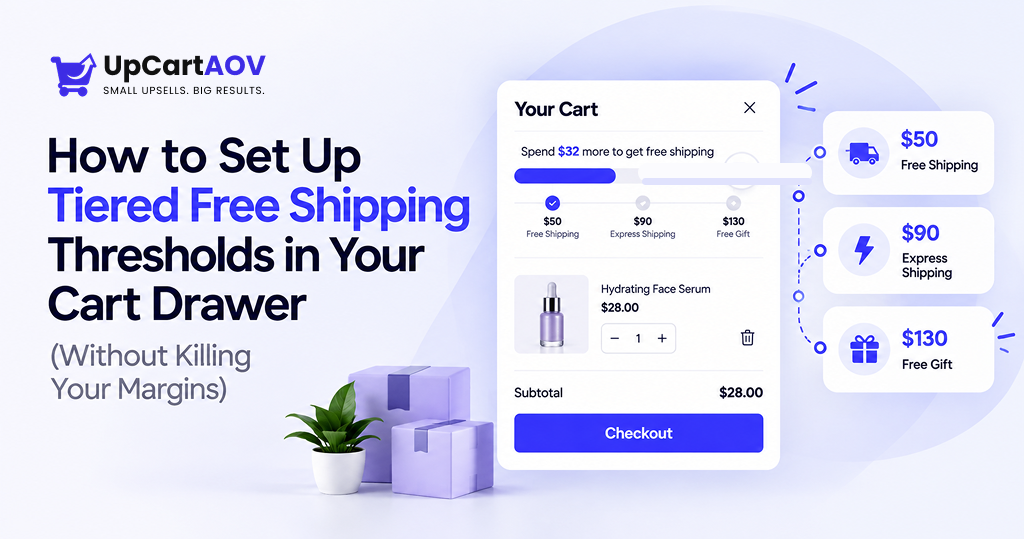
A few years back, a skincare founder got on a call with me, clearly frustrated.
“Anurag, I offer free shipping over $50. Nobody seems to care.”
My team opened her Shopify store while she was still talking. The offer was real, but it sat in a single line of footer text, and nobody reads footers. Her shoppers were adding a $38 serum, seeing a $7 shipping fee at checkout, and quietly leaving.
We didn’t change her offer. We changed where she showed it. We moved it into her cart drawer, split it into two tiers, and added a bar that told shoppers exactly how far they were from the next reward.
Within weeks, her carts started getting bigger.
That call stuck with me. I’ve spent years building Shopify stores with my team at ControlF5, across 4,000+ projects, and I’ve seen this pattern more times than I can count. The offer is usually fine. The visibility is the problem.
This guide covers everything we’ve learned about tiered free shipping thresholds: what they are, how to calculate them, and exactly how to set them up in your cart drawer, click by click.
Grab a coffee. By the end, you’ll have a setup you can launch this week.
What Are Tiered Free Shipping Thresholds?
A single threshold says, “Spend $50, get free shipping.” That’s it: one goal, one reward.
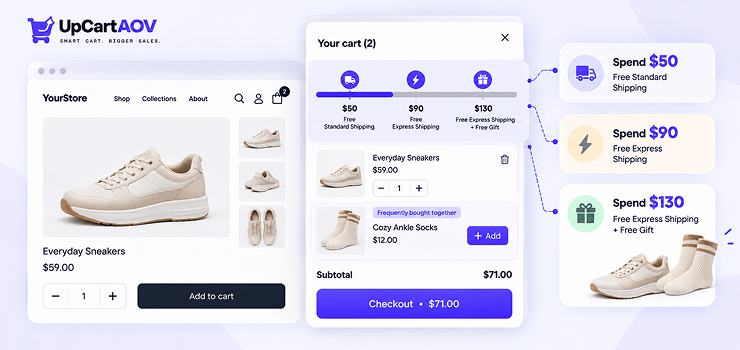
Tiered free shipping thresholds stack rewards like a staircase:
- Spend $50 → free standard shipping
- Spend $90 → free express shipping
- Spend $130 → free express shipping + a free gift
The magic is simple. The moment a shopper unlocks one reward, the next one is already waiting. There’s always a reason to add one more thing.
Here’s the formula I share with almost every client:
| Clear goal + visible progress + a reward worth chasing = a bigger cart |
Most Shopify stores use one of three tier structures: shipping upgrades (standard to express), shipping plus a free gift, or shipping plus a small discount.
Why the Cart Drawer Is the Right Place for This
Think about where your shopper’s head is at each stage.
An announcement bar gets seen before they’ve picked anything, so it’s just noise. The cart page needs an extra click, and many shoppers skip straight to checkout. The cart drawer slides open the second they add a product, at the exact moment they’re thinking about their order.
That’s why cart drawer free shipping messaging works so well. It shows up at the decision point, not before or after it.
My insight: When our Shopify experts audit a struggling Shopify store, we rarely find a traffic problem first. We find a cart that says nothing. A silent cart drawer is wasted space at the most valuable moment of the buying journey.
How Tiered Free Shipping Affects AOV and Conversions
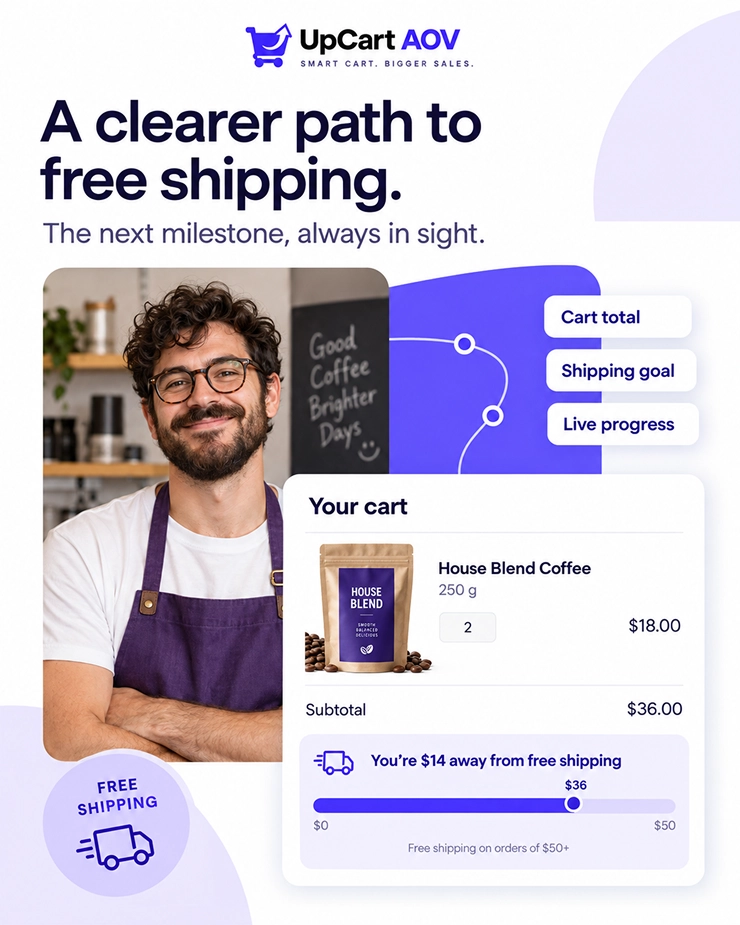
Three things happen inside a shopper’s brain when they see a free shipping progress bar.
1. The goal-gradient effect: People speed up as they get closer to a goal. Think of a coffee punch card with 8 of 10 stamps. You’re definitely coming back.
2. Loss aversion: “You’re $6 away from free shipping” doesn’t feel like an offer. It feels like leaving money on the table.
3. No surprise costs: Baymard Institute’s cart abandonment research has consistently found that extra costs, like shipping, are the top reason shoppers abandon checkout. A visible threshold removes the surprise before it happens.
Most “increase average order value Shopify” guides jump straight to discount codes and complicated upsell funnels.
In our experience, a well-built shipping threshold often does more, costs less, and takes an afternoon to set up.
A progress bar can make your shipping offers more visible and encourage customers to add another item. Read our guide on how a free shipping progress bar increases cart value to understand how it works.
Before You Start: How to Calculate the Right Threshold Tiers
This is where most advice on how to set a free shipping threshold falls short. People pick a round number like $50 or $100 because it “feels right.”
Don’t do that. Let your data pick it.
Step 1: Find your current AOV
- Log in to your Shopify Admin.
- Click Analytics in the left sidebar.
- Find the Average order value card on the dashboard.
- Click the date selector at the top and choose Last 90 days.
- Note the number. This is your starting point.
Check that it isn’t inflated by refunds or one-off bulk orders. Here’s how to calculate AOV correctly.
Step 2: Set tier 1 at 15–30% above your AOV
It should feel reachable with one extra item.
Current AOV × 1.2 ≈ your first tier
Step 3: Set tier 2 as a real stretch
Roughly 1.8–2x your AOV.
Step 4: Check the margin
Every free shipment is a cost you now absorb.
Here’s how this looks for a store with a $42 AOV:
| Tier | Threshold | Reward | Your avg. shipping cost | Why this number |
| Tier 1 | $50 | Free standard shipping | $6 | ~19% above AOV. One small add-on gets them there. |
| Tier 2 | $85 | Free express shipping | $11 | About 2x AOV. Rewards shoppers buying two products. |
| Tier 3 (optional) | $120 | Express + free mini product | $11 + $4 product cost | For loyal and bulk buyers. |
And the margin check:
| Extra revenue from bigger carts − shipping you now absorb = your real gain |
If that number comes out negative, raise the tier or change the reward. Simple.
My suggestion: Start with two tiers, not three. We’ve seen Shopify stores launch with four tiers and confuse everyone, including themselves. You can always add a third tier once you see how shoppers respond.
Here’s the decision flow our team follows before setting any Shopify free shipping threshold:
| Check your current AOV (last 60–90 days) ↓ Tier 1 = AOV + 15–30% ↓ Does your margin cover free shipping? ── No ──→ Raise the tier or change the reward ↓ Yes Do you have products priced to close the gap? ── No ──→ Add low-cost add-on products ↓ Yes Tier 2 = roughly 2x your AOV ↓ Launch → test for 2–4 weeks |
Setting the right shipping threshold is one way to encourage larger orders. You can also explore these ways to increase average order value on Shopify to find other strategies that complement tiered shipping rewards.
Setting Up the Shipping Rates in Shopify First
Here’s something people forget. The bar in your cart drawer is just a message. Shopify’s shipping settings are what actually apply free shipping at checkout. So set them up first.
Create your Tier 1 rate (free standard shipping):
- Go to Shopify Admin → Settings (bottom-left corner).
- Click Shipping and delivery.
- Under Shipping, open your General shipping rates profile.
- Find the shipping zone you want (for example, United States) and click Add rate.
- Choose Use flat rate, name it “Free Standard Shipping,” and set the price to $0.00.
- Click Add conditions → select Based on order price → enter $50.00 as the minimum price.
- Click Done.
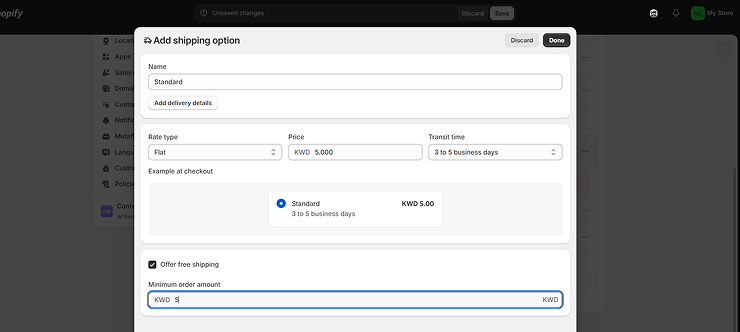
Create your Tier 2 rate (free express shipping):
- In the same zone, click Add rate again.
- Name it “Free Express Shipping” and set the price to $0.00.
- Click Add conditions → Based on order price → enter $85.00 as the minimum price.
- Click Done.
Adjust your paid rates so they don’t overlap:
- Edit your existing paid standard rate → Add conditions → Based on order price → set the maximum price to $49.99.
- Edit your paid express rate the same way, with a maximum of $84.99.
- Click Save at the top of the page.
Selling in multiple markets? Repeat steps 4–14 for each shipping zone, using local-currency thresholds where possible.
Our experts find this issue all the time: the cart drawer says “Free shipping unlocked!” and checkout still charges $6. Nothing destroys trust faster. Your Shopify rates and your bar must match exactly, down to the dollar.
Step-by-Step: Setting Up Tiered Free Shipping with UpCartAOV
A quick story first.
For years, our team kept building the same thing for client after client: a clean cart drawer, a tiered rewards bar, and smart product suggestions. Custom code, every single time. Eventually we asked ourselves why every Shopify merchant should have to pay for this from scratch.
So we built UpCartAOV, a Shopify app for cart drawer and product page upsells, shaped by what we learned in real Shopify stores.
Here’s how to set up tiered free shipping on Shopify with it.
Part 1: Install and activate the app
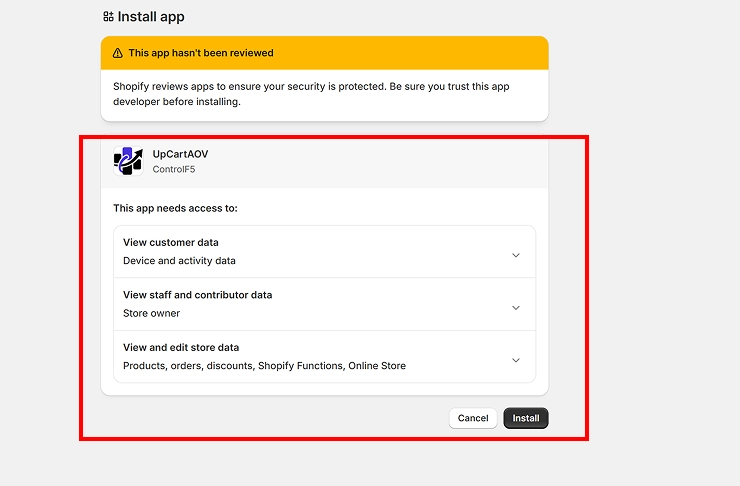
- Go to the Shopify App Store and search for “UpCartAOV.”
- Click Install and approve the permissions.
- Open the app from Shopify Admin → Apps → UpCartAOV.
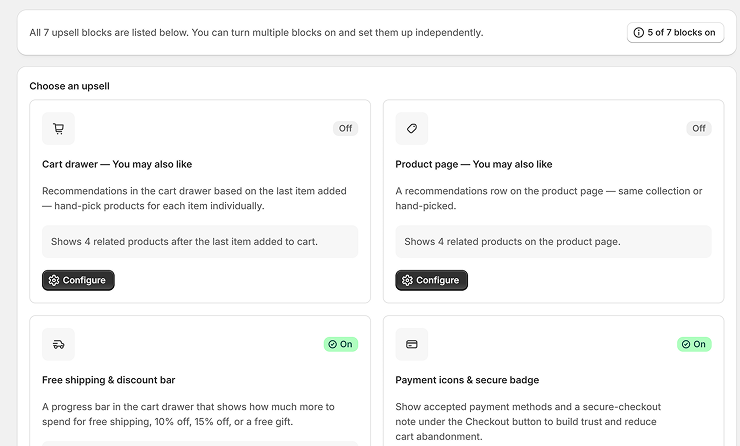
- Switch the cart drawer toggle to On.
Want to compare other options? Check out our list of the best free shipping bar apps for Shopify before choosing an app for your store.
Part 2: Turn on the app embed in your theme
- Go to Online Store → Themes.
- Click Customize on your live theme.
- Click the App embeds icon in the left panel.
- Toggle UpCartAOV on and click Save.
Part 3: Build your tiered free shipping bar
- Go back to the UpCartAOV dashboard and open the free shipping/rewards bar settings.
- Enable the free shipping progress bar.
- Click Add tier → enter $50 → set the reward label to “Free Standard Shipping.”
- Click Add tier again → enter $85 → set the label to “Free Express Shipping.”
- Write your three messages: one for before tier 1, one for between tiers, and one for when all tiers are unlocked. (You can steal the copy from the table below.)
- Set the bar color, text color, and icons to match your brand.
- Click Save.
Part 4: Test it like a real customer
- Open your store in an incognito window.
- Add a product below $50 and check that the drawer shows the right “$X away” message.
- Add another item to cross $50, and confirm the bar updates and the next tier appears.
- Click Checkout, enter an address in your shipping zone, and confirm “Free Standard Shipping” shows at $0.
- Repeat on your phone, then once more with a discount code applied.
That’s it. You now have a working free shipping bar on Shopify, and your checkout agrees with it.
Pair Thresholds with a Cart Drawer Upsell to Close the Gap
A progress bar tells shoppers how far they are. A cart drawer upsell gives them an easy way to get there.
If someone is $8 away from free shipping, show them a $9 lip balm. Don’t make them go hunting through your catalog.
| Gap amount + a product priced just above it = an easy “yes” |
Here’s what that journey looks like inside the drawer:
| Shopper adds a $42 serum ↓ Cart drawer opens → “You’re $8 away from FREE shipping 🚚” ↓ Upsell shows a $10 matching lip balm ↓ Shopper adds it → Tier 1 unlocked 🎉 ↓ “Add $33 more for FREE express shipping” ↓ Checkout with a $52 cart (instead of $42, or an abandoned cart) |
To set this up in UpCartAOV, go to the upsell / recommendations section → choose your gap-closing products (low-priced, related items) → turn on display inside the cart drawer → Save.
You can also personalize upsells based on cart contents to recommend relevant products that help shoppers reach their next shipping reward.
My experience: Relevance beats price. Showing the cheapest item in your store to close the gap feels random. Showing a product that matches what’s already in the cart feels helpful. That difference shows up in your numbers.
Copywriting Examples for Tiered Shipping Messages
Your bar is only as good as its words. Here are messages you can steal and adjust:
| Cart stage | Playful | Premium | Minimal |
| Below tier 1 | “Just $8 more and shipping’s on us 🚚” | “Add $8 to enjoy complimentary shipping” | “$8 to free shipping” |
| Between tiers | “Free shipping: done ✅ $33 more for express!” | “Complimentary shipping unlocked. $33 more for express delivery.” | “Free shipping ✓ · $33 to express” |
| All tiers unlocked | “You unlocked everything. Legend. 🎁” | “Every reward is yours. Thank you.” | “All rewards unlocked” |
Pick one tone and stick with it. A luxury candle brand shouldn’t sound like a meme page.
How to Measure Success and Optimize Your Tiers
Launching is step one. Watching the numbers is where the real wins come from.
| Metric | Where to find it | What good looks like |
| Average order value | Shopify Admin → Analytics | Moving up toward tier 1 |
| Conversion rate | Shopify Admin → Analytics | Stable or improving |
| Shipping cost as % of revenue | Shipping invoices vs. revenue | Staying within your budget |
| Cart abandonment rate | Analytics → Reports → checkout reports | Trending down |
| % of orders reaching each tier | Orders → filter by order total | A healthy share hitting tier 1 |
Run each setup for 2–4 weeks before judging it. Then adjust. You might push tiers slightly higher during BFCM and festive sales, when shoppers are already buying more.
A Real Shopify Store Example
One of our clients runs a home fragrance brand. They had a single threshold: free shipping over $75. Their AOV was around $48.
The problem was obvious once we looked. A $27 gap is too big to close. Shoppers didn’t even try.
We rebuilt it with two tiers, $55 for free standard shipping and $95 for free express shipping, and added wick trimmers and candle accessories as gap-closers in the cart drawer.
Within six weeks, their AOV climbed to around $58, and far more orders crossed the first tier. We didn’t add a new ad campaign or a new discount code. We just made the goal reachable and visible.
Expert Tips from My Team and Me
- Make tier 1 feel easy: If it feels out of reach, shoppers ignore it.
- Never let the bar and checkout disagree: Test after every shipping change.
- Use gifts at the top tier: A free mini product often feels more exciting than a bigger shipping upgrade.
- Keep the message short: Shoppers glance at it. They don’t read it.
- Revisit every quarter: Your AOV changes, so your tiers should too.
Final Thoughts
That skincare founder didn’t need a new product, a new ad budget, or a redesign. She needed her offer in the right place, at the right moment, with the right number.
Calculate the right tiers + configure them in Shopify + test the cart drawer = a cart that sells for you
If you want to set this up without writing a single line of code, try UpCartAOV. It’s the same tiered bar and upsell setup our team used to build by hand for clients, now ready for your store in minutes.
FAQs
Questions: How many free shipping tiers should a Shopify store have?
Answer: For most Shopify stores, two tiers is the sweet spot. The first gets shoppers to add one more item, and the second gives bigger buyers something to aim for. Launch with two, watch your orders for a month, and add a third only if many orders already cross tier two.
Questions: Does free shipping reduce profit margins?
Answer: It can if the tiers are set too low, because you end up paying shipping on orders that would have happened anyway. Set tier 1 at 15–30% above AOV and run the margin check before launching. If the math comes out negative, raise the threshold or switch to a cheaper reward.
Questions: Can I set different thresholds for different countries?
Answer: Yes, and international Shopify stores should. Go to Settings → Shipping and delivery and add separate price-based rates for each zone, in local currency where possible. Then make sure your cart drawer bar shows the same local amounts.
Questions: Do discount codes count toward the threshold?
Answer: In Shopify, price-based shipping rates are generally calculated after discounts, so a $60 cart with a $15 code counts as $45. This is a common reason shoppers see “free shipping unlocked” in the cart and still get charged at checkout. Always test your setup with a real discount code.
Questions: Can I offer a free gift instead of free shipping at a higher tier?
Answer: Absolutely, and it often works better at the top tier. A free travel-size product feels like a real treat and gets shoppers trying something new. Pick a low-cost, high-value item and keep enough stock so the reward never runs out.
Questions: Will a free shipping progress bar slow down my store?
Answer: A well-built Shopify app shouldn’t cause a noticeable slowdown. Check your speed with Google PageSpeed Insights before and after installing, on both mobile and desktop. If you see a drop, make sure you’re not running two cart apps at the same time.

