
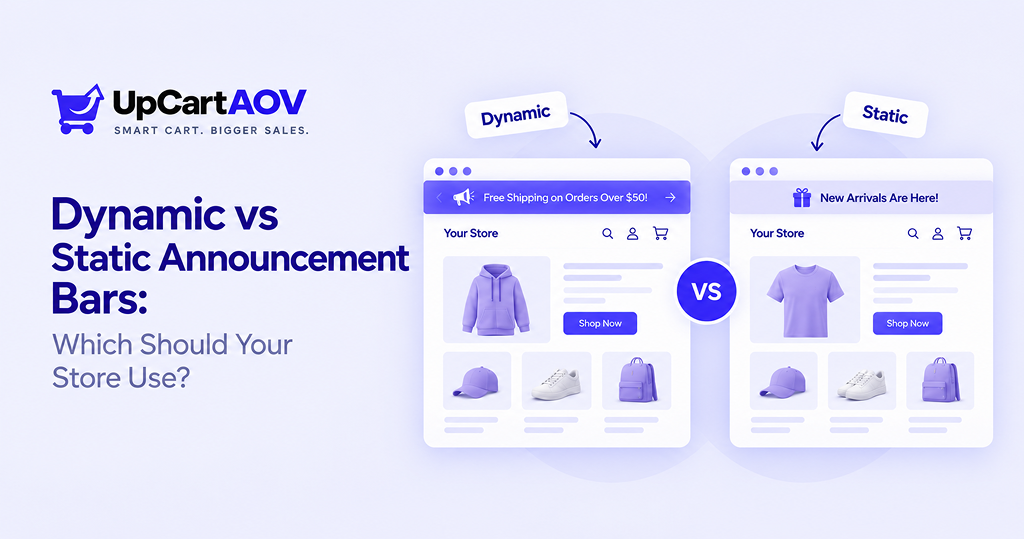
Austin runs a small skincare store on Shopify. Six months ago, he added an announcement bar, “Free shipping on orders over $50”, set it, and forgot about it. Last month, while going through analytics, he noticed visitors scrolling past that same bar without a second glance. It had quietly become wallpaper.
I’m Anurag, and I’ve spent years working closely with Shopify stores, watching what actually moves the needle on their storefronts versus what just looks nice.
One thing that keeps coming up, in almost every store audit I do, is the announcement bar. It’s small, it’s easy to set and forget, and most Shopify merchants never revisit it once it’s live.
That’s the real question behind dynamic vs static announcement bars, and in my experience working with Shopify stores, it’s one of those small design decisions that quietly shapes how much money you leave on the table every day.
Dynamic vs Static Announcement Bars
What is a Static Announcement Bar?
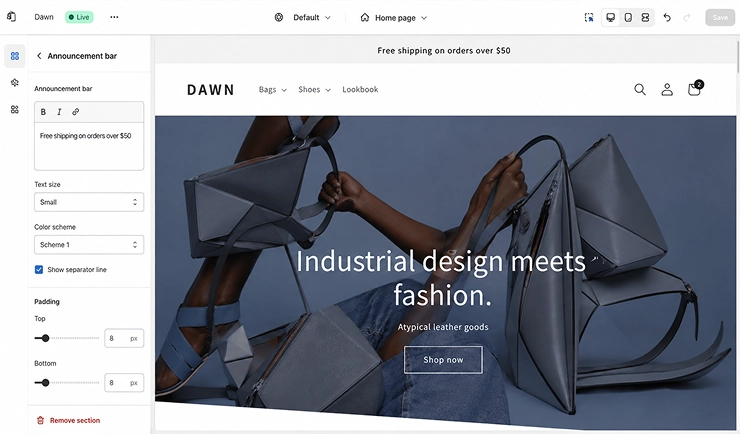
A static bar is exactly what it sounds like: one message, sitting at the top of your store, unchanged until you manually go in and edit it. Think “20% off storewide,” “Now shipping internationally,” or a simple welcome note.
It’s the equivalent of a sticky note on your shop’s front door. Useful, but it says the same thing to every single person who walks by, whether they’re a first-time visitor or someone who’s already added three items to their cart.
Where static bars genuinely work well:
- Store-wide sales or seasonal promotions
- Legal or shipping disclaimers that shouldn’t change
- Brand statements (“Handmade in small batches”)
- Stores that are just starting out and want something simple to set up
There’s nothing wrong with static bars. The problem shows up when a store relies only on one, forever, without asking whether it’s still pulling its weight.
What is a Dynamic Announcement Bar?
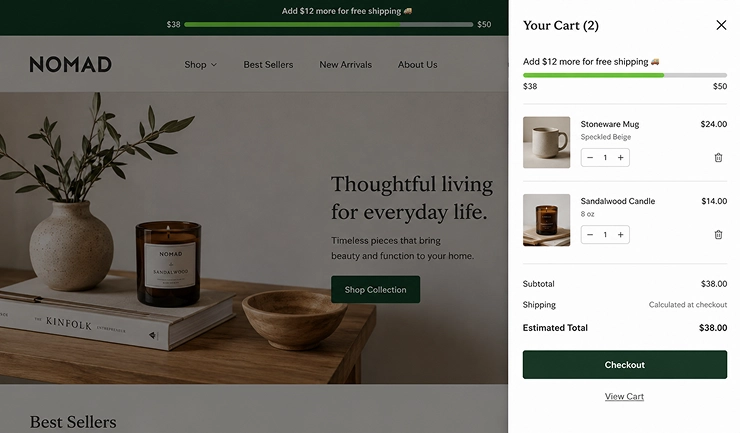
A dynamic announcement bar changes based on who’s looking at it and what they’re doing. It might update as a shopper adds items to their cart, show a countdown timer during a flash sale, or display different shipping thresholds depending on the visitor’s country.
Picture the difference: instead of a flat “Free shipping over $50,” a dynamic bar says “Add $12 more to unlock free shipping”, and that number actually shrinks as the shopper shops. It’s not a sign anymore. It’s a conversation.
That single shift, from a static claim to a live, responsive message, is really the heart of dynamic vs static announcement bars as a decision. One talks at the customer. The other talks with them.
How a Shopper Actually Experiences Each One
| It helps to see this as a flow rather than just a definition. Here’s what happens with a static bar: Visitor lands on store ↓ Sees same message every time ↓ Reads it once, ignores it after ↓ No change regardless of cart or behavior ↓ Bar has little influence on checkout decision |
Now compare that to a dynamic, cart-aware bar:
| Visitor lands on store → adds item to cart ↓ Bar checks cart value in real time ↓ Message updates: “Add $12 more for free shipping” ↓ Visitor adds one more item to cross threshold ↓ Bar updates again: “Free shipping unlocked!” ↓ Higher average order value at checkout |
Seeing it laid out this way makes the difference obvious: a static bar is a one-time message, while a dynamic bar is an ongoing nudge that responds at exactly the right moment.
Key Differences at a Glance
Here’s the side-by-side breakdown Austin wishes he’d seen before spending three months guessing.
| Factor | Static Bar | Dynamic Bar |
| Setup effort | Very low, one-time edit | Moderate — usually app or code-based |
| Personalization | None, same for everyone | Based on cart, location, or behavior |
| Update frequency | Manual, whenever you remember | Real-time, automatic |
| Best for | Simple announcements, policies | Conversion-driven messaging |
| Technical requirement | Theme editor text box | App or theme extension block |
If you’ve ever wondered why two stores selling nearly identical products convert differently, this small, easy-to-overlook bar is sometimes part of the answer.
When Static Bars Still Make Sense
It would be dishonest to say every store needs to rip out their static bar tomorrow. Some of the best-performing stores I’ve worked with still use one, because their message genuinely doesn’t need to change.
If you’re running a single, time-bound sale, or you just need to state your return policy, a static bar does the job without adding complexity you don’t need yet. Not every store is ready for, or needs, real-time personalization. Sometimes simple is smart, not lazy.
The mistake isn’t using a static bar. It’s forgetting you have one, and letting it go stale for a year while your promotions and inventory move on without it.
When Dynamic Bars Outperform
This is where things get interesting, and where most of the Shopify announcement bar best practices 2026 conversations are heading.
1. Cart-value-based bars: These are one of the clearest wins. A live free shipping threshold announcement bar example might look like this: a shopper adds a $38 item, and the bar instantly updates to “Add $12 more for free shipping.”
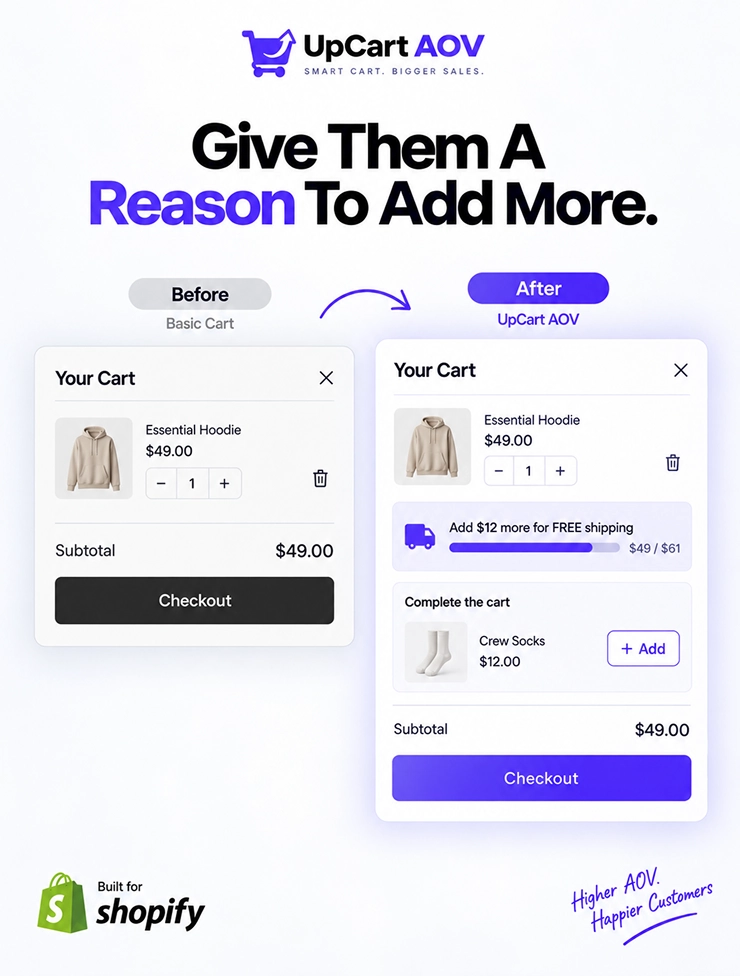
That’s not decoration; that’s a gentle push toward one more item in the cart, and it’s one of the simplest ways stores lift average order value without discounting anything.
2. Urgency-based bars: These work well for countdown-driven promotions, “Sale ends in 02:14:37”, because the ticking clock does something a static line of text never can: it creates a small, real sense that time is actually running out.
3. Geo-targeted and personalized announcement bars: These are another layer worth knowing about.
A shopper in Canada might see a different shipping message than one in the US, or returning visitors might see “Welcome back, here’s 10% off your next order” instead of the generic first-time message everyone else gets.
And here’s a detail that’s easy to miss: a well-placed, clickable announcement bar CTR improvement often comes just from adding a simple arrow or “Shop Now” link to a bar that used to be plain text. People click things that look clickable. Obvious, but constantly overlooked.
Real Impact: What the Data Shows
Here’s what tends to show up across stores that switch from a flat message to a live, cart-aware bar, based on what I’ve suggested and tested with merchants:
| Metric | Static Bar (typical) | Dynamic Bar (typical) |
| Visitor engagement with bar | Low, ignored after first visit | Higher, especially near threshold |
| Average order value impact | Minimal to none | Noticeable lift, often driven by “just one more item” behavior |
| Message relevance | Same for all visitors | Personalized to cart, location, or timing |
| Merchant effort to maintain | Manual updates needed | Runs automatically once configured |
This is the pattern behind why a free shipping progress bar in the cart drawer tends to outperform a plain announcement at the top of the page; it shows up at the exact moment a shopper is deciding whether to check out or add one more thing.
That’s not a coincidence; it’s timing.
Implementation: How to Set Up Each Type on Shopify
Setting up a static announcement bar
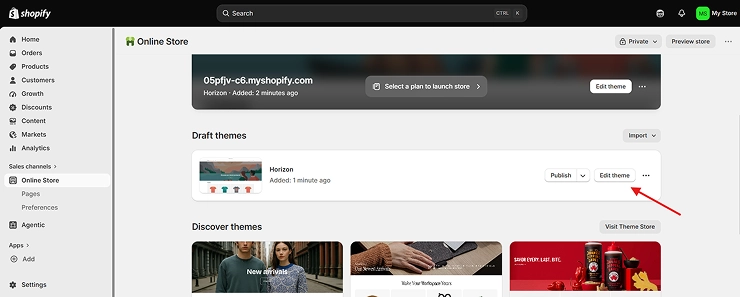
Step 1: Open your Shopify admin and go to Online Store → Themes → Customize.
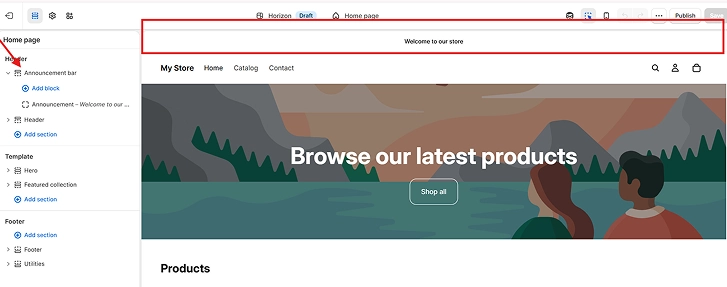
Step 2: Find the “Announcement bar” section in the theme customizer, most Shopify 2.0 themes have this built in near the top of the header settings.
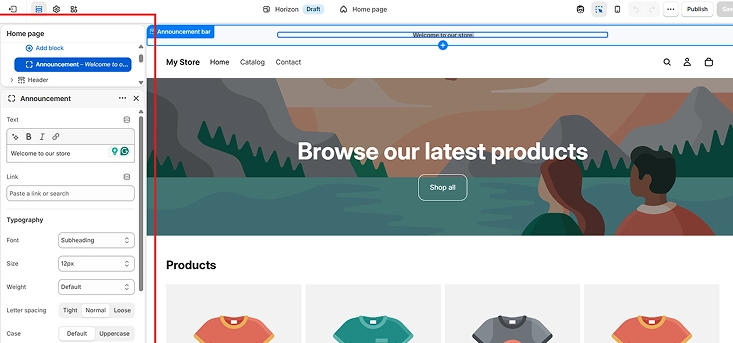
Step 3: Type your message; keep it short, one line, something like “Free shipping on orders over $50.”
Step 4: Pick your bar colors so it matches your brand and stands out against your header.
Step 5: Add a link (optional) if the message should point somewhere, like a sale collection page.
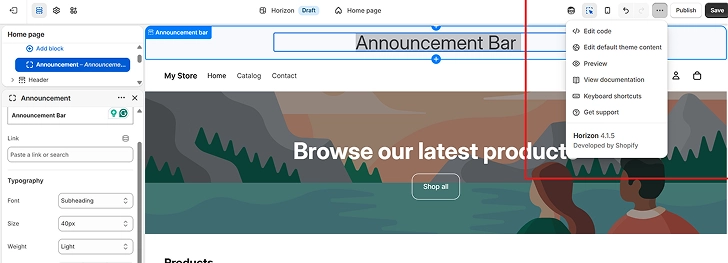
Step 6: Preview on both desktop and mobile before publishing, since text that fits on desktop can wrap awkwardly on smaller screens.
Step 7: Publish; that’s it, no code needed.
Setting up a dynamic announcement bar
Step 1: Decide what should trigger the change: cart value, visitor location, or time (for a countdown).
Step 2: Choose a theme app extension block or app built for Shopify Online Store 2.0 themes, since these load asynchronously and won’t slow down your storefront.
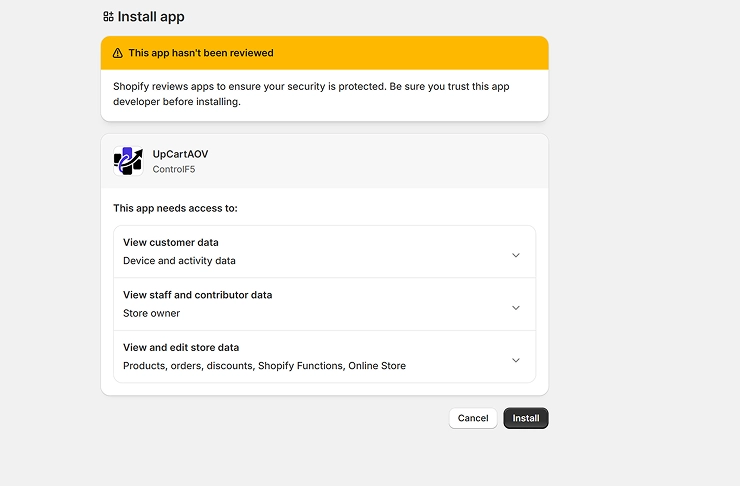
Step 3: Install and add the block to your cart drawer or header from the app’s dashboard; this is usually a drag-and-drop step inside the theme editor.
Step 4: Set your thresholds or rules, for example: “show free shipping progress until cart hits $50,” or “show a different message for visitors outside the US.”
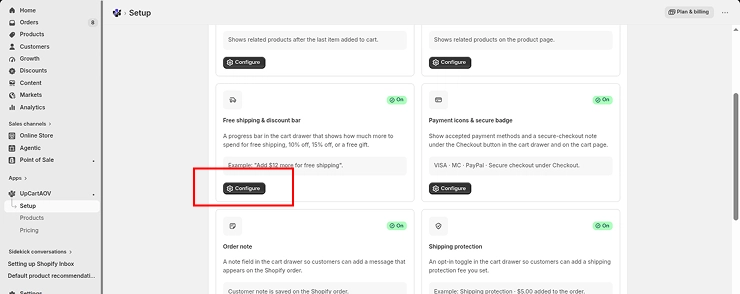
Step 6: Customize the message and design to match your store’s tone and colors, the same way you would a static bar.
Step 7: Test the live behavior by adding and removing items in a test cart to confirm the bar updates correctly in real time.
Step 8: Check mobile display carefully, since progress bars and countdowns are the most likely elements to break on smaller screens.
Step 9: Turn it on and monitor performance; most apps will show you engagement or conversion data once it’s live, so you can confirm it’s actually helping.
A quick note on mobile-friendly announcement bar design tips: keep the text short enough to read in one glance, avoid stacking multiple messages that push content down the screen, and test that any countdown or progress bar doesn’t get cut off on smaller viewports.
A bar that looks great on desktop but breaks on mobile is worse than no bar at all, since most Shopify traffic today is mobile.
Common Mistakes to Avoid
A few patterns show up again and again:
- Message overload: cramming three announcements into one bar that nobody has time to read
- Letting static bars go stale: a “Black Friday Sale” bar still live in February
- Ignoring mobile testing: dynamic bars especially need to be checked on small screens
- No clear action: a bar with no link or CTA is just noise, not a nudge
Fixing even one of these is often the first real step toward better announcement bar conversion optimization strategies, before you even touch anything more advanced.
Which Should Your Store Use? A Simple Decision Framework
Choosing between the two isn’t about picking a winner; it’s about matching the bar type to where your store actually is right now. Here’s how I’d break it down:
Store stage and traffic
- New store, low traffic, simple message → a static bar is fine for now. Don’t overbuild before you need to.
- Established store with steady, returning visitors → consider a rotating announcement bar vs single message setup, cycling between two or three offers instead of one static line.
Business goal
- Focused on average order value and checkout behavior → a dynamic, cart-aware bar, like a free shipping threshold bar, is where the real upside is, since it responds at the exact moment a shopper is deciding whether to buy more.
- Focused on brand awareness or policy communication → a static bar communicates this reliably without added complexity.
Audience spread
- Mostly local or single-market traffic → a static or simple rotating bar usually covers this well.
- Running international traffic across multiple regions → geo-targeted and personalized announcement bars start to matter a lot more here, since shipping costs and delivery times genuinely differ by country.
Technical comfort
- Comfortable editing theme code or using a no-code app → dynamic bars are easy to set up today, even without a developer.
- Prefer minimal setup and maintenance → start static, and revisit dynamic once the store has enough traffic to justify the extra layer.
As a rule of thumb: static bars are about communication, dynamic bars are about conversion. Most growing stores eventually need a bit of both.
Wrapping Up
Austin ended up doing something simple: he kept his static bar for seasonal sale announcements, but added a live free shipping progress bar inside his cart drawer. Within a couple of weeks, he noticed shoppers adding one more item just to cross the threshold, something his old, unchanging bar never once did.
That’s really the takeaway here. This isn’t about declaring one option the permanent winner. It’s about understanding what each type of bar is actually good at, and using them where they fit.
If you’re ready to test a cart-aware, dynamic free shipping bar without touching a single line of code, that’s exactly the kind of block UpCartAOV was built to handle.
FAQ
Question: Do dynamic announcement bars slow down my store?
Answer: Not if they’re built as lightweight, asynchronous blocks. Poorly coded dynamic bars can add load time, so check that whatever app or code you use isn’t render-blocking.
Question: Can I A/B test announcement bars?
Answer: Yes, and I’d suggest you do. Testing a rotating message against a single static one is one of the easiest low-risk experiments a store can run.
Question: Are dynamic bars only useful for big stores?
Answer: No. Even small stores see a lift from a simple cart-based free shipping bar; it doesn’t require huge traffic to work, just a bit of setup.
Question: What’s the biggest difference in the dynamic vs static announcement bars debate?
Answer: Relevance. Static bars say the same thing to everyone. Dynamic bars respond to what the shopper is actually doing, which is why they tend to convert better.

