
I’m Anurag Pandey. I’ve spent over 15 years building Shopify stores for ecommerce brands, and I’ve lost count of how many times I’ve watched a client panic during a slow sales week and reach for the same lever: a 20% discount banner slapped across the homepage.
I remember one client in particular. Revenue went up that week. Profit went down. Hard. When we sat down with the numbers afterward, it clicked for both of us: the Shopify store didn’t have a discount problem; it had a perceived value problem. So the next campaign we ran was different: instead of cutting the price, we added a free travel pouch to orders over a certain amount. Same margin hit, roughly.
But customers reacted completely differently. They felt like they’d won something, not like the store was desperate to sell.
That’s where my obsession with free gift-with-purchase Shopify campaigns started. Since then, I’ve built dozens of Shopify stores and eventually built a cart drawer app of my own, which puts me in a slightly unusual seat: I’ve watched Shopify merchants burn money on bad promos from the outside, and now I build the tool they use to fix that exact problem.
Everything in this playbook comes from patterns I’ve seen play out across real stores, not just theory.
What Is Free Gift with Purchase, Exactly?
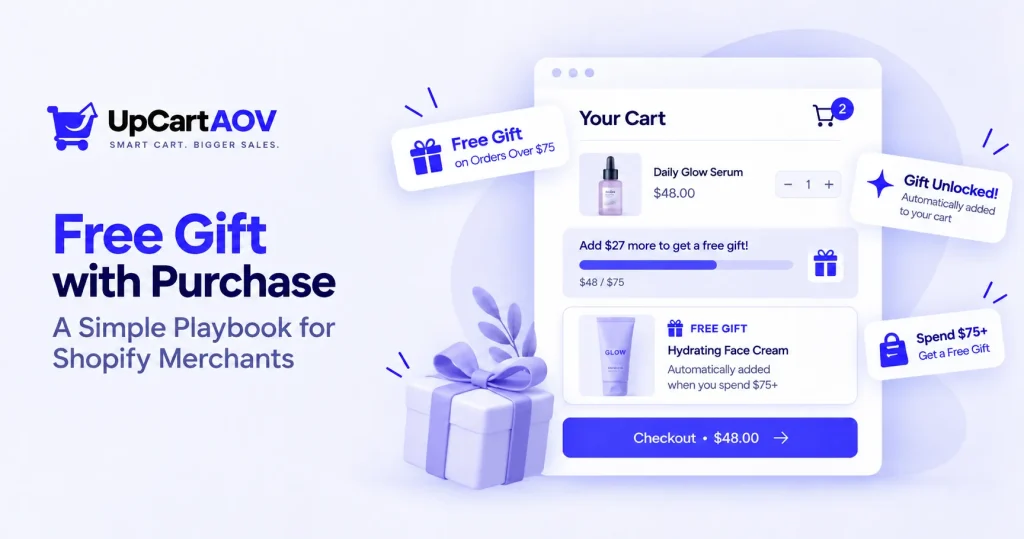
Free Gift with Purchase (FWP) is when a customer receives a complimentary product after meeting a condition, usually a spend threshold or buying a specific item. It’s different from BOGO (buy one get one) and different from a discount code, because nothing about your listed prices changes. You’re adding value, not subtracting it.
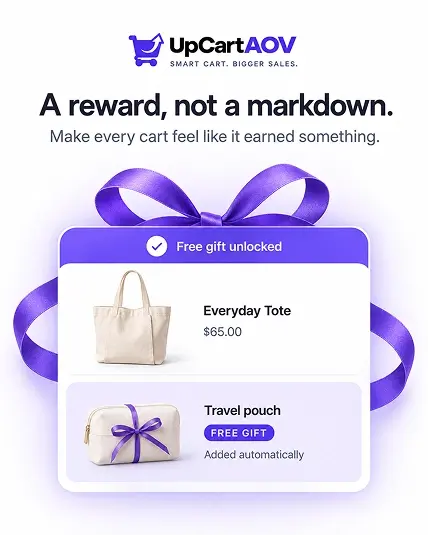
This distinction matters more than people think. A Shopify gift with purchase strategy protects your pricing integrity while still giving the customer a reason to say yes today, not next week.
Why This Actually Works (Not Just a Gut Feeling)
Behavioral economists call it “reciprocity”: when someone gives us something, we feel a pull to give something back, and in retail, that “something back” is usually a completed purchase, a bigger cart, or a repeat order.
From a numbers standpoint, merchants running structured FWP campaigns consistently see it as one of the most reliable ways to increase AOV with Shopify free gifts without touching their price architecture.
Unlike a blanket discount, the cost of the gift is fixed and known in advance, which means your margin math stays predictable.
| Approach | Effect on AOV | Effect on Margin | Perceived Value |
|---|---|---|---|
| Straight discount (e.g. 15% off) | Mixed | Drops sharply | Low (“just a sale”) |
| Free Gift with Purchase | Increases | Controlled, predictable | High (“I earned this”) |
| BOGO | Increases | Drops moderately | Medium |
How to Calculate Your Margin Before Offering a Free Gift
Think of your margin like a fuel tank. Every gift you give away burns a little fuel; the trick isn’t to avoid burning any, it’s to know exactly how much you can afford to burn before you’re running on empty.
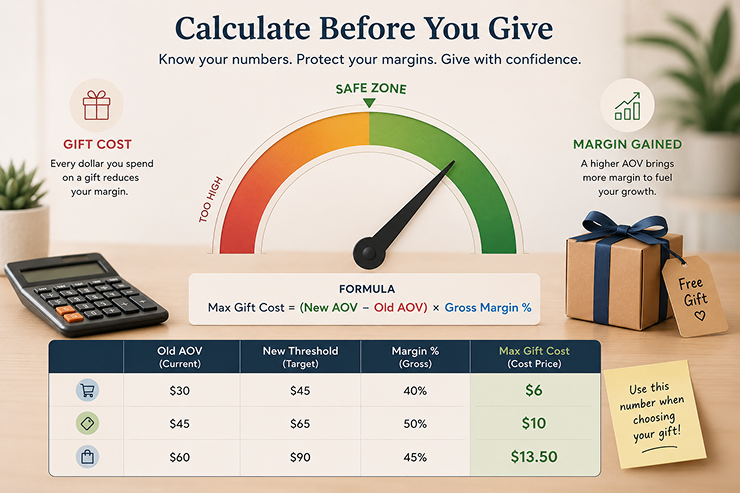
Here’s the formula I use before launching any offer, and it takes two minutes on a calculator:
| Max Gift Cost = (New AOV − Old AOV) × Gross Margin % |
Worked example:
- Old average order value (AOV): $45
- New threshold you’re setting: $65 (a $20 jump)
- Gross margin: 50%
Max Gift Cost = $20 × 0.50 = $10
So you can safely spend up to $10 (cost price, not retail price) on the gift without hurting your margins, assuming customers actually hit that new threshold.
| Old AOV | New Threshold | Margin % | Max Gift Cost |
|---|---|---|---|
| $30 | $45 | 40% | $6 |
| $45 | $65 | 50% | $10 |
| $60 | $90 | 45% | $13.50 |
Keep this table nearby when you’re picking gifts; it stops the “this gift looked cute so I picked it” mistake, which I’ve made more than once.
The 3 Core FWP Models
- Threshold-based: Spend $X, get a gift. Simple, works for almost every store.
- Product-based: Buy Y, get Z free. This is the classic Shopify buy X get Y free gift setup, great for moving specific SKUs.
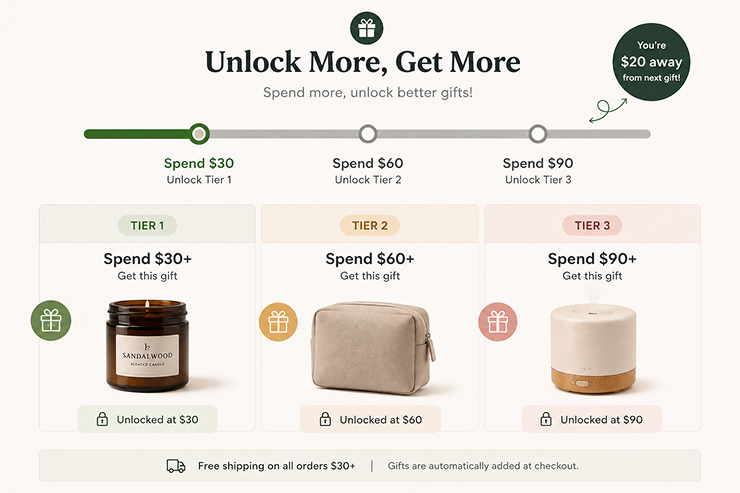
- Tiered/gamified: Multiple thresholds, better gifts at higher spend. This is where a tiered free gift strategy ecommerce approach shines, especially with a visible progress bar.
Where FWP Should Actually Live: The Cart Drawer
Here’s the mistake I made for years: gating the gift logic behind the checkout page. By the time a customer reaches checkout, they’ve already mentally finalized their cart. Asking them to add more at that point rarely works.
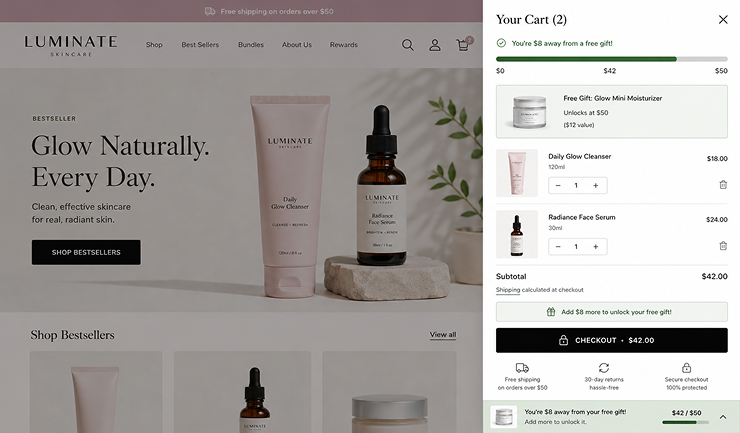
The cart drawer, the slide-out panel that opens when someone clicks “Add to Cart”, is the one place customers look at repeatedly while shopping. Here’s exactly where and how the offer should show up:
- Right under the cart line items: a progress bar reading “You’re $8 away from a free gift” so it’s the first thing customers see
- A gift thumbnail preview, not just text; customers respond to seeing the item, not reading about it
- Real-time updates: the bar recalculates instantly as items change, no page refresh
- A one-line nudge near checkout: “Add $8 more to unlock your gift” right above the CTA
- A mobile sticky version: collapse into a slim bar on small screens instead of pushing checkout down
- Auto-swap logic: if the cart drops below threshold, the gift auto-removes with a gentle message, not a silent disappearance
Doing this well nudges the customer while they’re still deciding, not after, which is why it consistently outperforms a checkout-page banner.
Step-by-Step to Set Up Free Gift with Purchase on Shopify: Manual vs. Automatic
I’m writing this section as if you’ve never touched Shopify’s backend before, because most beginners land here confused, not lazy.
Follow it top to bottom, no scrolling around guessing where things are.
a. Manual Setup (Native Shopify, No App)
Step 1: Create the gift as a hidden product
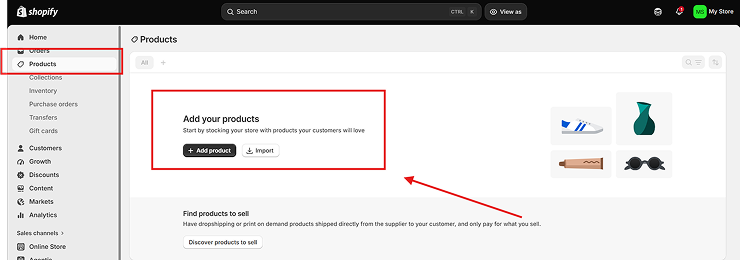
Go to Shopify Admin → Products → Add Product.
Set the price to $0.00, name it clearly like “GIFT – Travel Pouch (Do Not Sell),” and use a SKU starting with “GIFT-” for easy tracking.
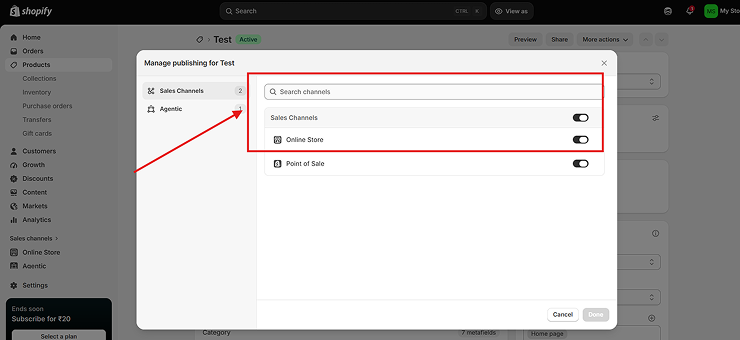
Step 2: Remove it from sales channels
On the same page, scroll to “Sales channels and apps” and uncheck Online Store, so customers can’t find or buy it directly.
Step 3: Turn off inventory tracking
Under “Inventory,” uncheck “Track quantity,” so the gift never blocks checkout by showing as out of stock.
Step 4: Create the discount rule
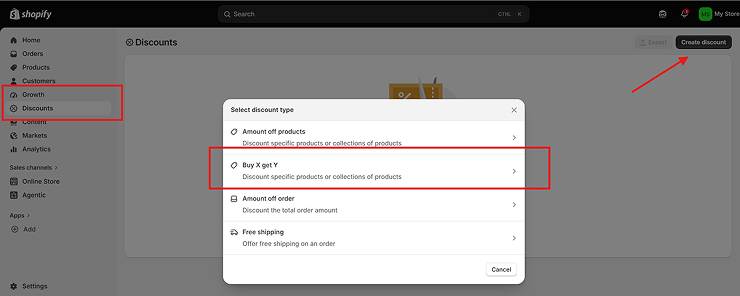
Go to Discounts → Create Discount → Buy X Get Y.
Under “Customer buys,” set your threshold (e.g., $65). Under “Customer gets,” select the gift product at 100% off, limit one per order.
Step 5: Check combination rules. Under “Combinations,” decide if this can stack with sitewide discounts; test carefully so gifts don’t get orphaned mid-checkout.
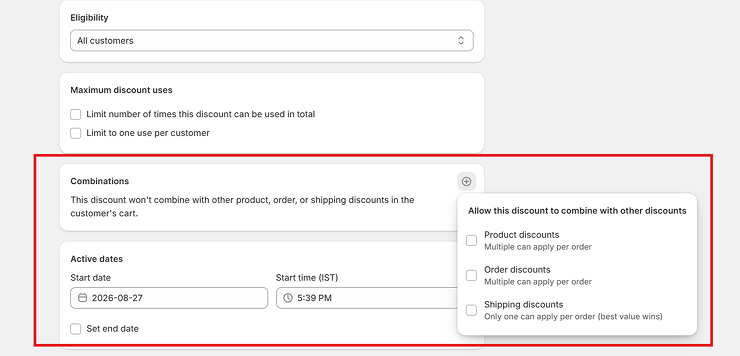
Step 6: Test end-to-end. In an incognito window, add items past the threshold and confirm the gift applies correctly at checkout, not just in the cart.
Where this breaks down: Shopify’s native discount only reduces the gift’s price once it’s already in the cart; it won’t auto-add it. Customers must find and add it themselves, or you’ll need Ajax Cart API scripting (Plus) to auto-insert it.
b. Automatic Setup (Using a Shopify App)
This is exactly how it works inside UpCartAOV, the cart drawer app my agency built, the same flow applies to most cart drawer apps with gift-with-purchase support.
Step 1: Install the app
From the Shopify App Store, open its dashboard.
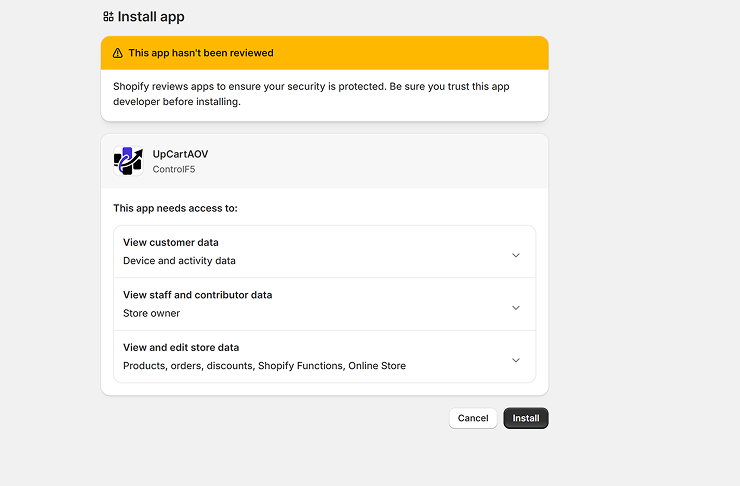
Step 2: Turn on the progress bar
Go to Setup and find the “Free shipping & discount bar” card, this shows customers how much more to spend for free shipping, a discount, or a free gift. Click Configure.
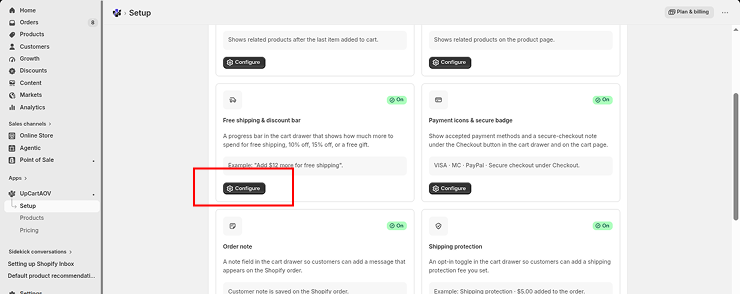
Step 3: Open the Free Gift slot.
Inside Settings, scroll to the numbered reward slots (Free shipping → 10% off → 15% off → Free gift). Toggle on “Unlock a free product at this spend limit.”
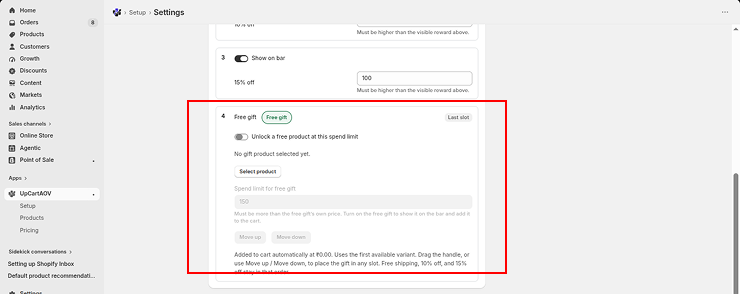
Step 4: Select the gift product
Click Select product, search your catalog, and choose the exact product and variant to give away.
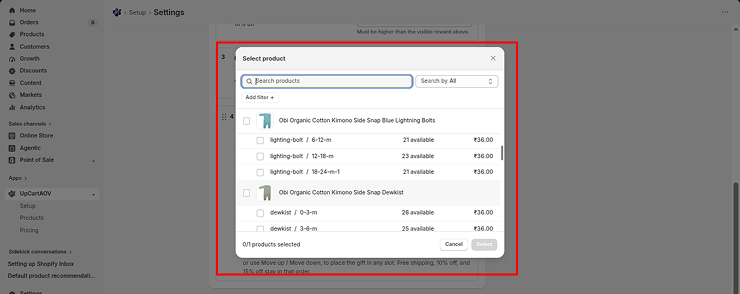
Step 5: Set the spend limit
Enter the minimum order value that unlocks the gift — it must be higher than the gift product’s own price, or the app will flag it.
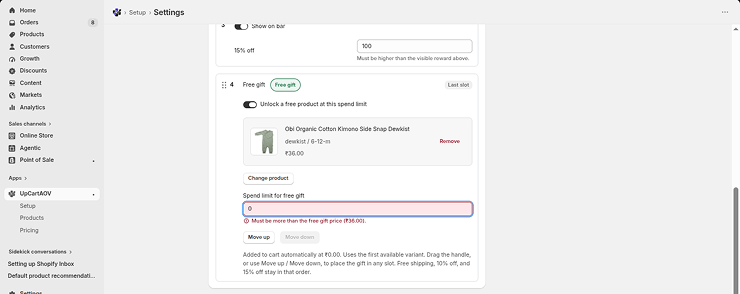
Step 6: Save
The gift auto-adds at ₹0.00 once the threshold is crossed, and auto-removes if the cart drops back below it; no discount codes needed.
Step 7: Preview it live
Confirm the progress bar shows “You’ve unlocked Free gift!” once the threshold is hit, with the gift card showing a “FREE GIFT” badge and “Added automatically.”
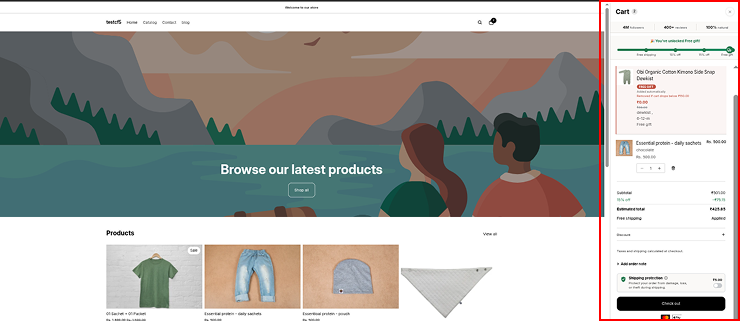
c. Manual vs. Automatic — Quick Comparison
| Factor | Manual Setup | Automatic (App) |
|---|---|---|
| Setup time | 20–30 minutes | Under 5 minutes |
| Ongoing effort | Manual monitoring | Fully automated |
| Customer visibility | Low (checkout only) | High (live cart drawer) |
| Technical skill needed | Comfortable with Discounts admin | None — guided settings |
| Best for | Testing one-off offers | Running FWP long-term |
What Shopify Merchants Are Saying
“We tested a $50 threshold gift and saw our average cart size grow within the first week.”
“Having the offer visible in the cart drawer instead of buried at checkout made a real difference in how many people actually reached the threshold.”
Conclusion
Free gift with purchase isn’t a gimmick; it’s one of the few promotional levers that grows your average order value without training customers to wait for discounts. Whether you start manually or jump straight to an automated cart drawer setup, the principle stays the same: make the offer visible, make the math work, and let customers feel like they earned something.
If you’re ready to see this working live in your own Shopify store’s cart drawer, that’s exactly what I built my app to do.
FAQs
Question: Does free gift with purchase hurt margins?
Answer: Not if you calculate the max gift cost against your margin first; that’s exactly what the formula above is for.
Question: Can I combine FWP with discount codes?
Answer: Yes, but cap it; stacking too many incentives can quietly erode margin without you noticing. Check your discount “combination” settings before launching.
Question: What’s the best gift price point relative to AOV?
Answer: As a rough starting rule, keep gift cost under 15–20% of the AOV increase you’re targeting.
Question: What’s the most common mistake merchants make with FWP campaigns?
Answer: Picking a gift with no clear relevance to the store, or hiding the offer somewhere customers won’t see it while actively shopping, usually the checkout page instead of the cart.
Question: How do I know if my FWP campaign is actually working?
Answer: Track four numbers weekly: average order value, conversion rate, gift redemption rate, and repeat purchase rate. If AOV rises but redemption is low, your threshold is probably too high. If redemption is high but AOV barely moves, the gift might be too easy to get.
Question: Do I need Shopify Plus to run a free gift campaign?
Answer: No, the manual native setup works on any Shopify plan. Shopify Plus is only needed for advanced checkout-level customization or custom Ajax Cart scripting for auto-add without an app.

